The all-in-one tool built to run your flight school
Works alongside Flight Schedule Pro, Flight Circle or Flycore.
Every call, text, email and website chat lands in one inbox and gets answered, even when the owner is teaching, flying, or already on the phone.
14-day free trial on every plan. Card required, no charge until day 14, cancel anytime. Setup is free: we text you shortly (next business morning if it’s after hours) to build your cockpit with you.
A new lead arrives. A website form, call, text or chat lands in one inbox the second it comes in.
Animated product demo with demo data. Silverpine Flight Academy is our demo school and the people are made up. Real screens are right below.
Where it comes from: our work for Take Flight Aviation
The follow-up system we ran at Take Flight Aviation, now built into one piece of software. These numbers are from the marketing we ran for Take Flight. Take Flight did not use Click to Cockpit.
Estimated time saved
About 2 hours a day back
Calling back, texting, chasing the inquiry you missed while you were flying: Click to Cockpit does the chasing, and the hours add up.
What 730 hours is worth
About 91 full workdays (730 ÷ 8 hours).
Example: at $20 an hour for front-desk time, 730 hours is $14,600 a year. The Cruise plan is $3,588 a year. Use your own hourly number.
- Missed a call while flying? The caller gets a text back automatically.
- Same questions every day? Saved replies answer them in seconds.
- Five places to check? Calls, texts, email, chat and web forms land in one inbox.
Estimated, based on 2 hours saved a day. 2 × 7 days = 14 a week (flight schools run weekends) · 2 × 365 = 730 a year · 730 ÷ 12 ≈ 61 a month, shown as about 60. The chart is an example: 3 hours a day of follow-up by hand against 1 hour a day with Click to Cockpit. Your numbers will differ.
We're in the business of filling your discovery-flight calendar
Click to Cockpit is the front door of the school: everything that happens between the ad click and the first lesson. It works alongside the tools you already run.
What you get: the actual software
Real screens from the live preview, demo school, 30 September 2026. Not renders. Labels say what is live and what is in progress. Click any screen to see it full size.Tap any screen to see it full size.
Swipe to see all 12 screens →
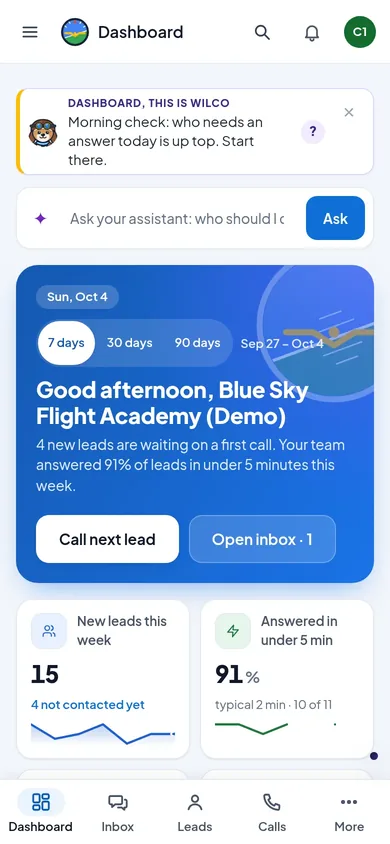
Everything a lead touches, in one place
Tap a tab. Every screen is the real software.
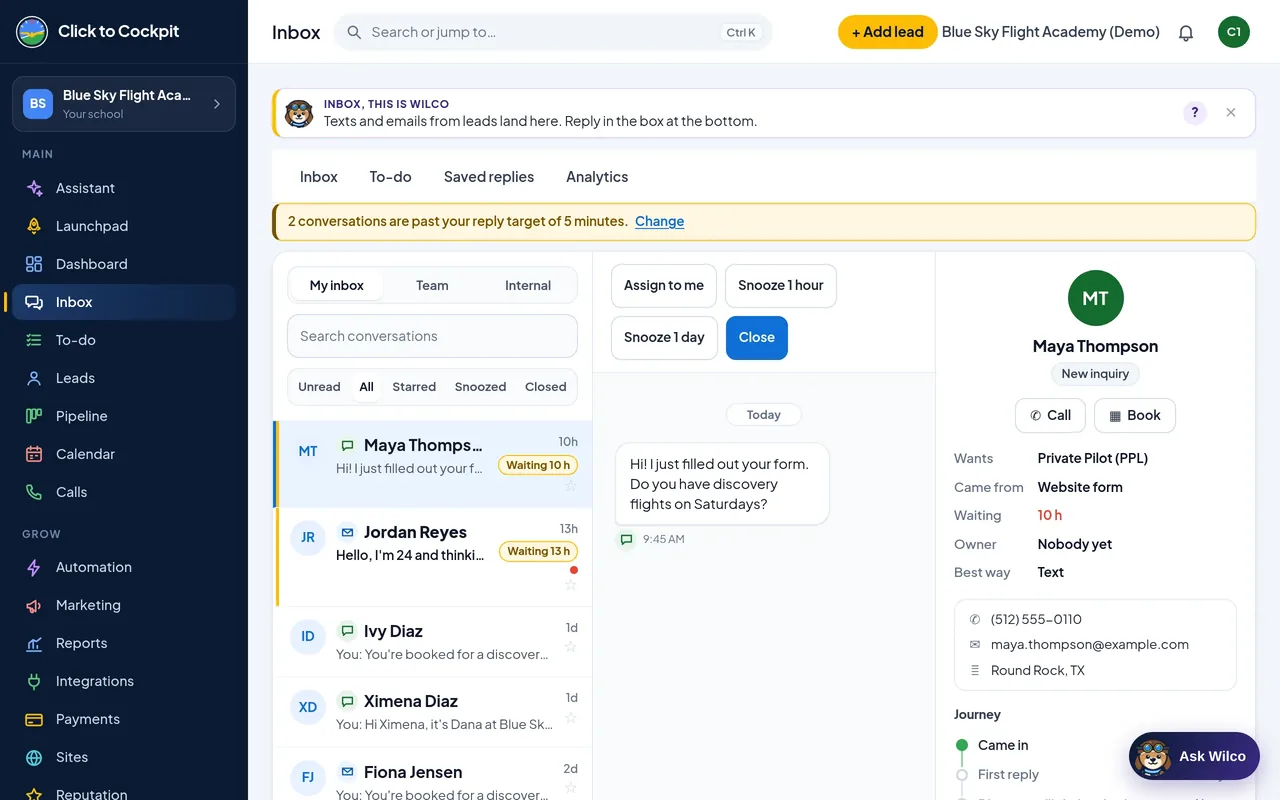
Every inquiry, one thread per person.
Texts, email, website chat and forms land in the same place, so nothing sits in a personal phone or a missed voicemail.
- Texts, email, chat and forms together
- Unread, starred and snoozed views
- My inbox and a team inbox
- Source and status on every lead
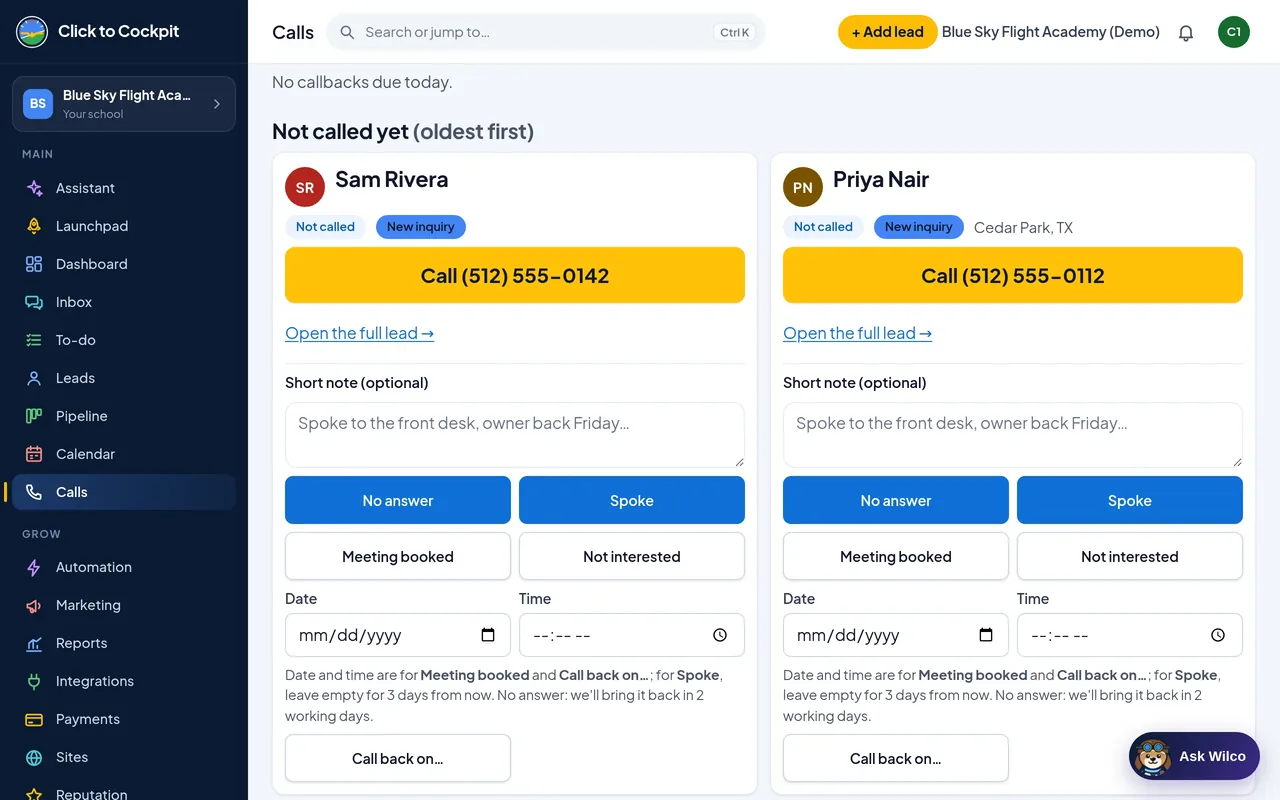
Calls with the script on screen.
Missed a call while you were flying? It texts the person back, and the voicemail lands in the inbox.
- Missed-call text-back
- Voicemail to inbox
- Call script on screen
- Outcome logged on the lead
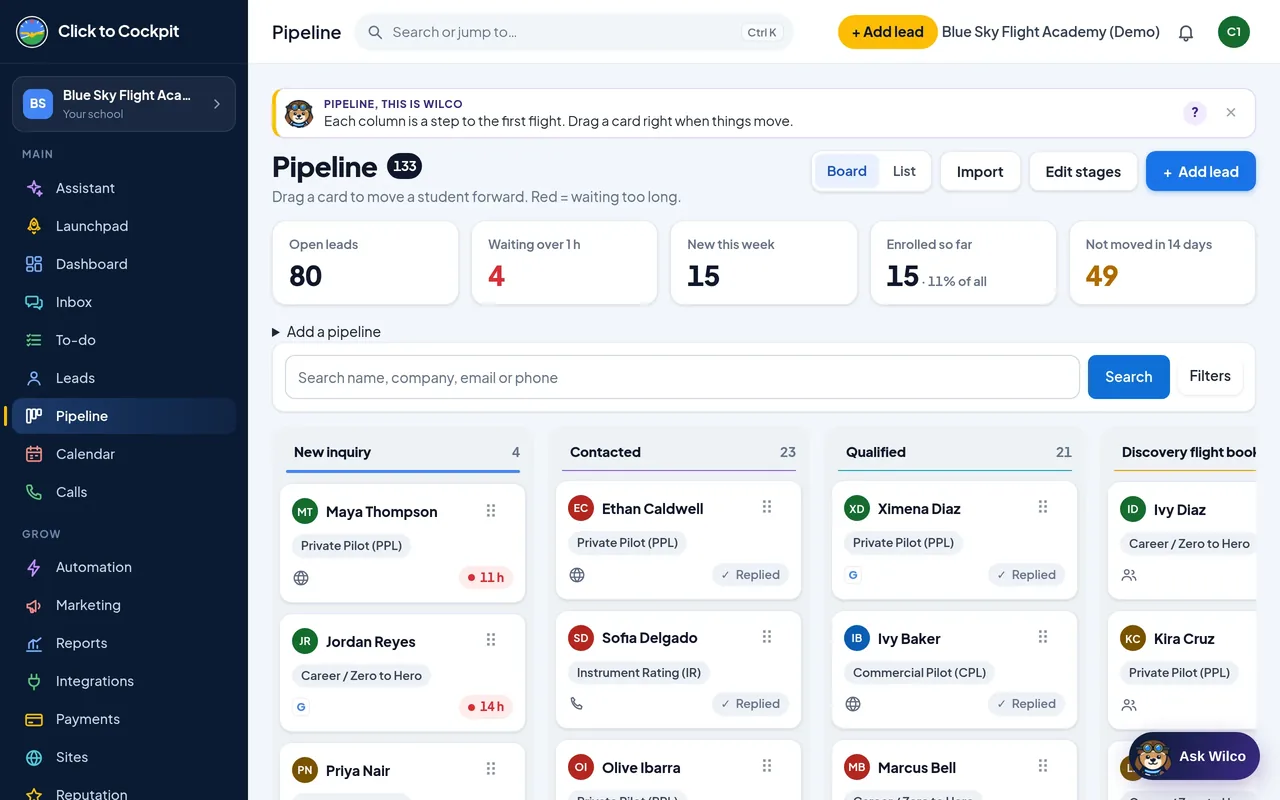
See every student's stage at a glance.
A board with flight-school stages. Drag a card to move it.
- New inquiry → Contacted → Qualified → Discovery flight → Enrolled
- Drag and drop, or use the keyboard
- A waiting-time flag on every card
- Search and filters
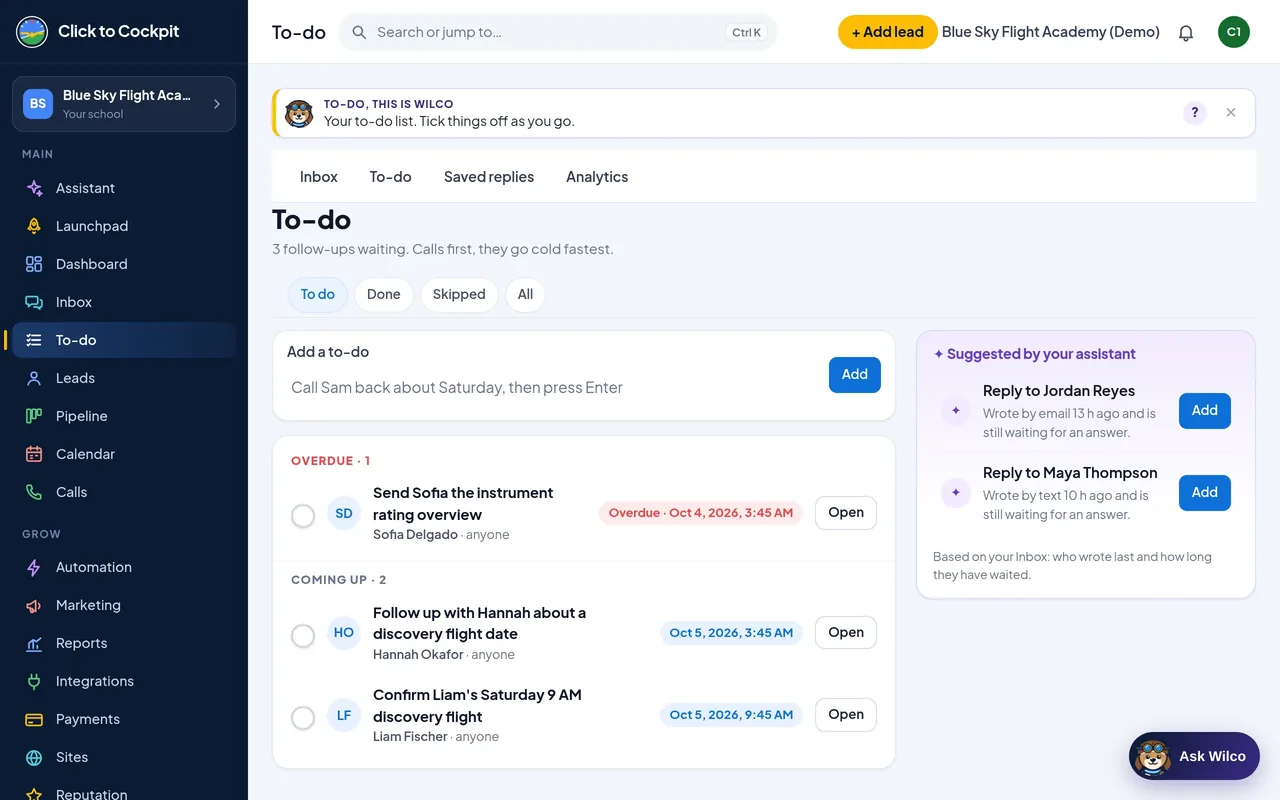
The front desk always knows who is next.
The To-do list lines up every follow-up, in order, so no inquiry waits on someone remembering it.
- Call queue in order
- Every lead with source, status and last touch
- Reply-time report by channel
- Dashboard: today's inquiries and callbacks due
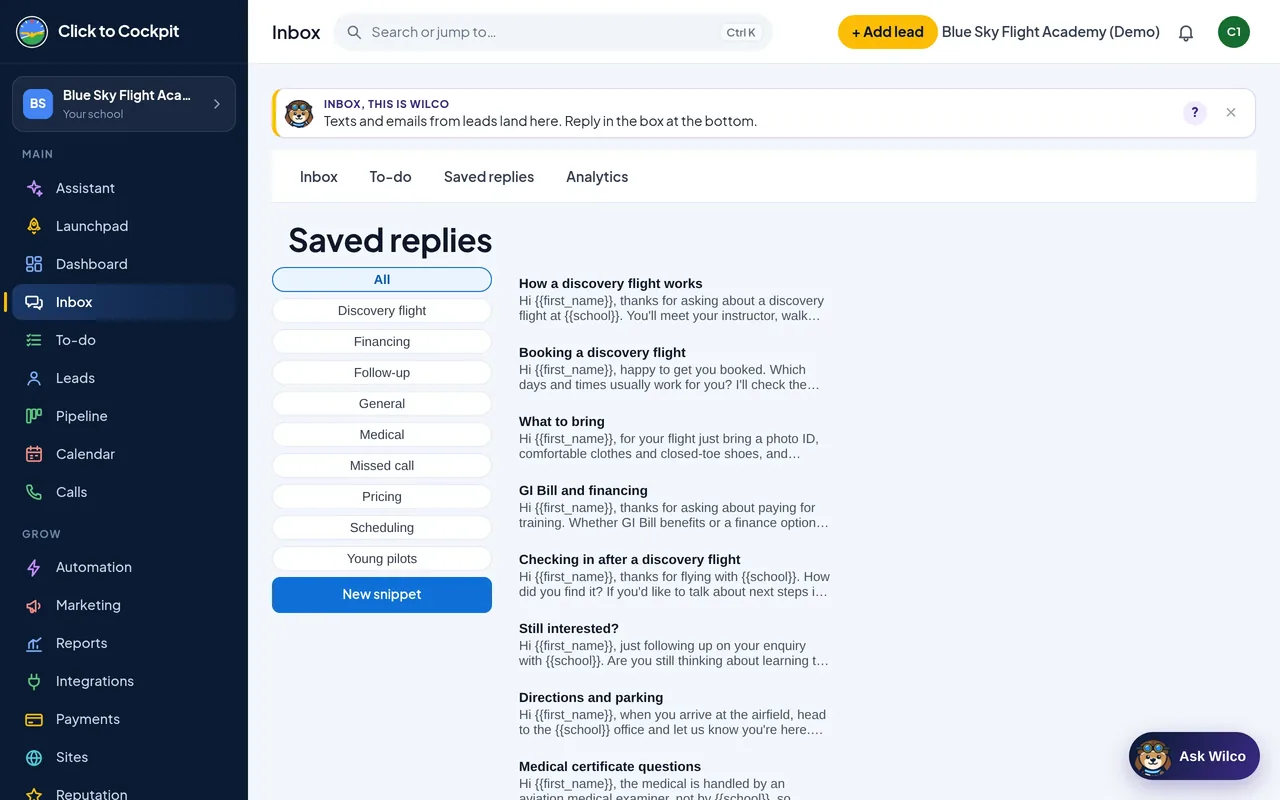
Answer the usual questions in one tap.
The questions every school gets, answered the same way by everyone on your team.
- Discovery flight questions
- Financing questions
- Medical questions
- Scheduling questions
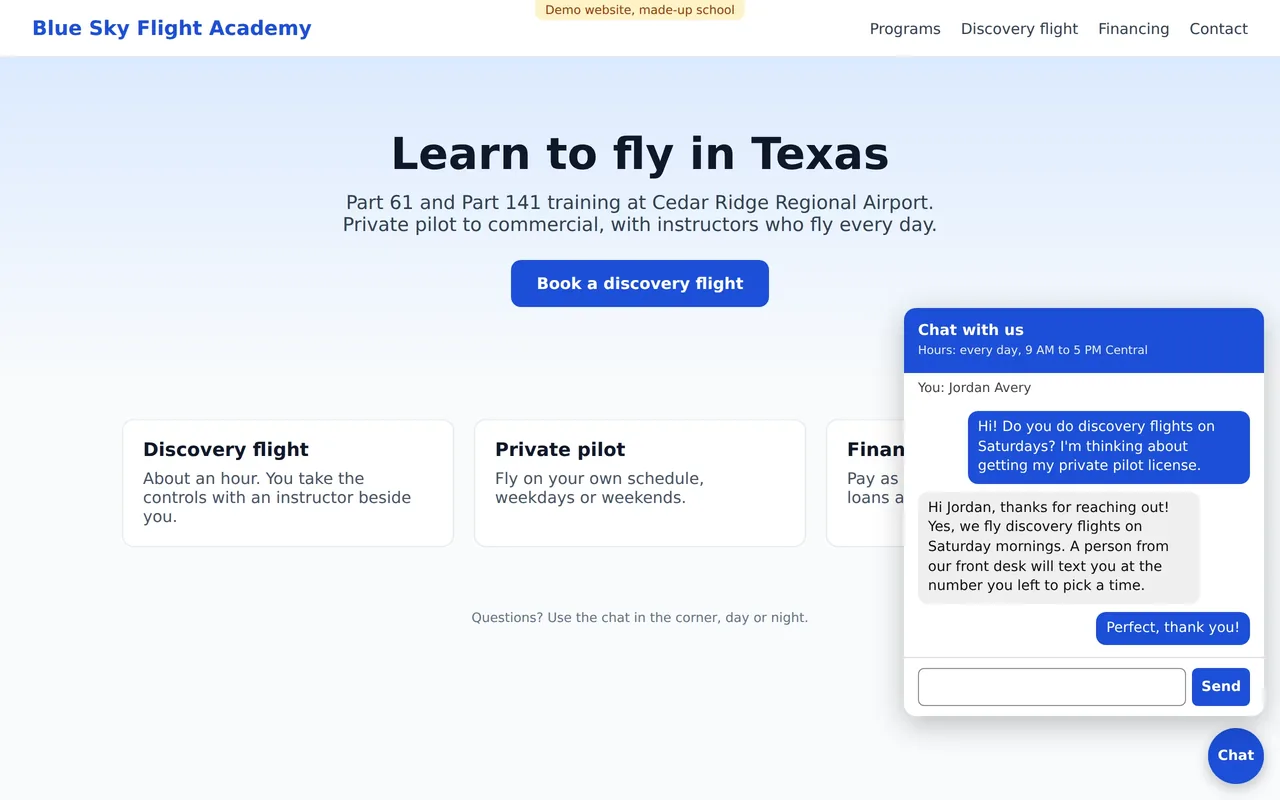
A chat on your website that hands off to a person.
Visitors leave a name and phone, ask their question, and the conversation lands in your inbox.
- Shows your hours
- Captures name and phone
- Hands off to a real person
- Lands in the same inbox
Profit tracking Rolling out
See which ads actually make you money
A lead is not a student. The Profit report sets what you spent on each ad against what the students from that ad paid you.
- Profit per ad source and campaign: what you spent, what students paid, what is left
- Cost per enrolled student and return on ad spend, worked out for you
- The funnel: inquiries → discovery flights booked → flown → enrolled → paying students
- Download the numbers as a spreadsheet file (CSV)
Built and tested, rolling out to accounts with the next app update. You enter your ad spend (type it in or import a file) and record each student's payments; Click to Cockpit does the math. Profit here means what students paid minus what the ads cost. On the Cruise and Full Crew plans.
Start 14-day free trial →Recreated from the real Profit report screen. Demo numbers from our demo school, not a real school's results. See the real screen →
Integrations Coming QuickBooks, Square, Xero, and an API to build your own. Need one sooner? We build integrations for you.
Your all-in-one solution for the whole pilot's path
Click a stage. Green ticks are live on the preview today; the clock marks what is being built now and is labeled the same way on every plan.
Every inquiry answered, even when the owner is busy Live
At most schools the owner takes the calls, and the owner is also the one teaching, flying and running the place. The inquiry that hears nothing for an hour books somewhere else. Click to Cockpit catches it and answers it.
- One inbox: calls, texts, email, website chat, web forms
- Missed-call text-back from the school's own number
- Voicemail lands in the inbox with a call-back task
- Website chat widget that hands off to a person
- Web forms with texting consent built in
- Saved replies for the front desk (snippets)
- Texting from the school's own Android phone
- Google Voice relay, team login with 2-step
Book the discovery flight Board live
A pipeline with flight-school stages, not sales-team stages. Who is new, who was contacted, who is booked, who showed. The front desk sees who to call next and the owner sees the board from the phone.
- Pipeline board: New inquiry → Contacted → Qualified → Discovery flight → Enrolled
- Manual-action queue: who to call next, in order
- Calls page with the script on screen
- Conversation analytics: how fast each inquiry was answered
- Booking pages with a deposit and staff / aircraft availability Coming
- Text and email reminders so the seat is not empty Coming
- Automatic follow-up: text, email, call task on a schedule Coming
Enrolled, and nothing lost In progress
The training ladder: students, instructors, aircraft, programs and ratings as real records, not a spreadsheet. Bring your students in from Flight Schedule Pro, Flight Circle or a CSV. Being built now; the import wizard and settings pages are already on the preview.
- Students list with the training ladder In progress
- Import wizard: Flight Schedule Pro, Flight Circle, CSV In progress
- Programs, aircraft, instructors, ratings settings In progress
- Custom fields and companies (corporate, guardians) In progress
- E-sign, invoices, text-to-pay Coming
- Signup and trial billing Coming
- ✓Discovery flightSat 14 Sep
- ✓Enrolled · Private Pilot programDana
- ✓First soloN172SP
- 4Checkridescheduled
- 5Instrument ratingnext
The next rating sells itself Coming
When a private pilot finishes, the instrument conversation should start by itself. Follow-up sequences with a text, an email and a call task, on a schedule that respects quiet hours, and a review request when the checkride is passed.
- "Passed the checkride" sequence: congratulations, next-rating offer Coming
- Review request to Google after the milestone Coming
- Quiet hours and consent on every message Coming
- Consent stored, STOP / HELP rules already built
- 1Text: "Congratulations, Alex! Welcome to the club."day 0
- 2Email: what the instrument rating opens upday 3
- 3Call task for the chief instructorday 7
- 4Review request (Google)day 10
Bring back the ones who went quiet Coming
Every school has a list of people who asked, never booked, and were never called again. A "gone quiet 90 days" list and a one-tap text to all of them, with consent tracked and every reply landing back in the inbox.
- "Gone quiet 90 days" list, built automatically Coming
- One-tap text broadcast with an opt-out on every message Coming
- Replies land in the same inbox, live today
- Consent and STOP / HELP handled, live today
We exist to make sure no inquiry goes unanswered while the owner is flying, teaching, or already on the phone.
One login for calls, texts, email, chat, forms and the pipeline. A stack of separate subscriptions and a person gluing them together, gone.
Stages, snippets and reports use the words a school uses: discovery flight, first solo, checkride, next rating.
Bryghton Media builds it and answers the phone. A pilot who ran a flight school's marketing, not a faceless platform.
For about a year and a half Bryghton ran the marketing at Take Flight Aviation in Montgomery, New York. On Google Ads the school's leads went from 99 a month to 173 between February and April 2026, and every inquiry got a text, an email and a call. Click to Cockpit is that follow-up system, built into software.
Take Flight Aviation · Google Ads result, run by Bryghton MediaA real result, not a testimonial. Take Flight did not use Click to Cockpit; the software came after.What's included with Click to Cockpit
Keep your scheduling and billing software. This is everything before a person becomes a student.
Twelve jobs a school pieces together from up to 17 different tools, $370+ a month, in one login here from $149.
Replaces up to 17 tools
Other-tool figures are approximate list prices for a three-person front desk (September 2026), rounded. "SOON" rows are being built now and are shown the same way on every plan. Logos belong to their owners and are shown only to name the tools this replaces. Not replacing your scheduling software: Click to Cockpit works alongside Flight Schedule Pro, Flight Circle and Flycore. They run scheduling, Click to Cockpit makes sure every lead gets answered.
| Features | Replaces | Other tools | Click to Cockpit |
|---|---|---|---|
| Lead inbox & pipeline (CRM)Lead inbox & pipeline | HubSpotGoogle Sheets | ≈ $60/month | ✓ |
| Two-way texting, your numberTwo-way texting | Quo (OpenPhone)Google Voice | ≈ $57/month | ✓ |
| Missed-call text-back & voicemail to inboxMissed-call text-back | A separate phone system | ≈ $30/month | ✓ |
| Website chat widget | TidioIntercom | ≈ $29/month | ✓ |
| Web forms with texting consentWeb forms + consent | TypeformJotform | ≈ $29/month | ✓ |
| Calls page & call trackingCalls & call tracking | CallRail | ≈ $45/month | ✓ |
| Saved replies & call scriptsSaved replies, scripts | Google Docs+ sticky notes | Hours a week | ✓ |
| Student import from FSP / Flight CircleStudent import | Re-typing every student | Hours a week | SOON |
| Discovery-flight booking & remindersBooking & reminders | CalendlyAcuity | ≈ $36/month | SOON |
| Automated follow-up sequencesAutomatic follow-up | ZapierMailchimp+ a person | ≈ $50/month | SOON |
| Profit per ad and campaign reportProfit per ad report | Google Sheetsby hand | Hours a week | SOON |
| E-sign, invoices, review requestsE-sign, invoices | DocuSignSquarePodium | ≈ $40/month | SOON |
| Overall price | Up to 17 tools and 17 logins | $370+/month$370+ a month, up to 17 logins | $149 |
Everything you need to run the front desk, even from the ramp
- On your phone: the inbox, the board and who to call next, from the FBO couch or the right seat after landing.
- Your own number: texts go out from the school's Android phone, not a random short code.
- Set up with you: after you sign up we text you shortly (next business morning if it’s after hours) and build the stages, snippets and forms with you. Free.
Pricing
Pick a plan and start your 14 days
14-day free trial on every plan. Card required, no charge until day 14, cancel anytime. Founding schools keep their price for as long as they stay, and setup is free. See a live demo first →
← Swipe to compare the 3 plans → See a live demo
One location, two users. Your team runs it. $1,489 a year (two months free).
- Lead inbox and pipeline board with flight-school stages
- Web form and lead-forwarding email into the inbox
- Instant auto-reply email to every inquiry
- Copy or export a lead to Flight Schedule Pro
- Speed-to-lead report
14 days free, then $149/month. Renews automatically until you cancel. Pay yearly · Terms
Unlimited users. $2,989 a year (two months free). Extra location $100/month.
- Everything in Minimum and…
- Unlimited users: front desk, CFIs, owner
- Two-way texting from the school's own number, missed-call text-back, voicemail to inbox
- Website chat widget
- Automatic follow-up and discovery-flight reminders Coming
- Profit report: which ads paid off Rolling out
- AI features, pay as you go Coming
14 days free, then $299/month. Renews automatically until you cancel. Pay yearly · Terms
Built around your school: we answer and manage your phone calls. A real person from Bryghton Media works every lead.
- Everything in Cruise and…
- We call, text and email every new lead inside your Click to Cockpit
- Statuses kept current, weekly report
- We write and design your program information forms
- One strategy call a month
Price depends on your school's situation and needs. We set it with you on the demo. · Terms
Made by a pilot who ran a flight school's marketing
Bryghton is an instrument-rated private pilot. For about a year and a half he ran the marketing at Take Flight Aviation in Montgomery, New York: Google Ads, YouTube, Facebook, Instagram and TikTok, the website, email, and the follow-up on every inquiry. The lesson was simple: the school that answers first gets the student, and the owner cannot answer first from the right seat. Click to Cockpit is that answer, built into the all-in-one software made just for flight schools.
Straight answers
The questions flight schools ask us most.
Does it replace Flight Schedule Pro, Flight Circle or Flycore?
No. Not replacing your scheduling software. Click to Cockpit works alongside Flight Schedule Pro, Flight Circle and Flycore: they run scheduling, Click to Cockpit makes sure every lead gets answered. It is the front door, everything between the ad click and the first lesson. Student import from Flight Schedule Pro and Flight Circle is being built now.
Whose phone number do the texts come from?
Your school's own number. No short codes, so the number on your sign is the number that replies. We set up texting with you after you sign up.
Is it actually built?
Yes. Every screenshot on this page is the real software, shown on a demo school (the animated demo at the top uses demo data). Items marked Coming or In progress are being built now and are labeled the same way on every plan.
What does setup cost, and how long does it take?
Setup is free. After you sign up we text you shortly (next business morning if it’s after hours) and build it with you: stages, snippets, the web form and the chat widget. Most schools are answering inquiries from the inbox the same day.
What if I cancel during the free trial?
Cancel anytime from your billing page during the 14 days and you keep full access until day 14. You are never charged.
Is there a contract?
Month to month, or a year with two months free. Founding schools keep their price for as long as they stay.
Can I see it before I pick a plan?
Yes. Every screenshot on this page is the real software, and the 14-day trial is the full product with nothing charged until day 14. Or book a demo and we walk you through it live.
Does an AI pretend to be a person?
No. The chat widget and missed-call text-back say who they are and hand off to a real person. Wilco, the assistant inside Click to Cockpit, helps your staff and never poses as staff.
Works with the tools you already use
Works alongside Flight Schedule Pro, Flight Circle and Flycore: they run scheduling, Click to Cockpit makes sure every lead gets answered.
Put your school in the cockpit
Pick a plan, add a card, and nothing is charged until day 14. We text you shortly (next business morning if it’s after hours) and set it up with you.
